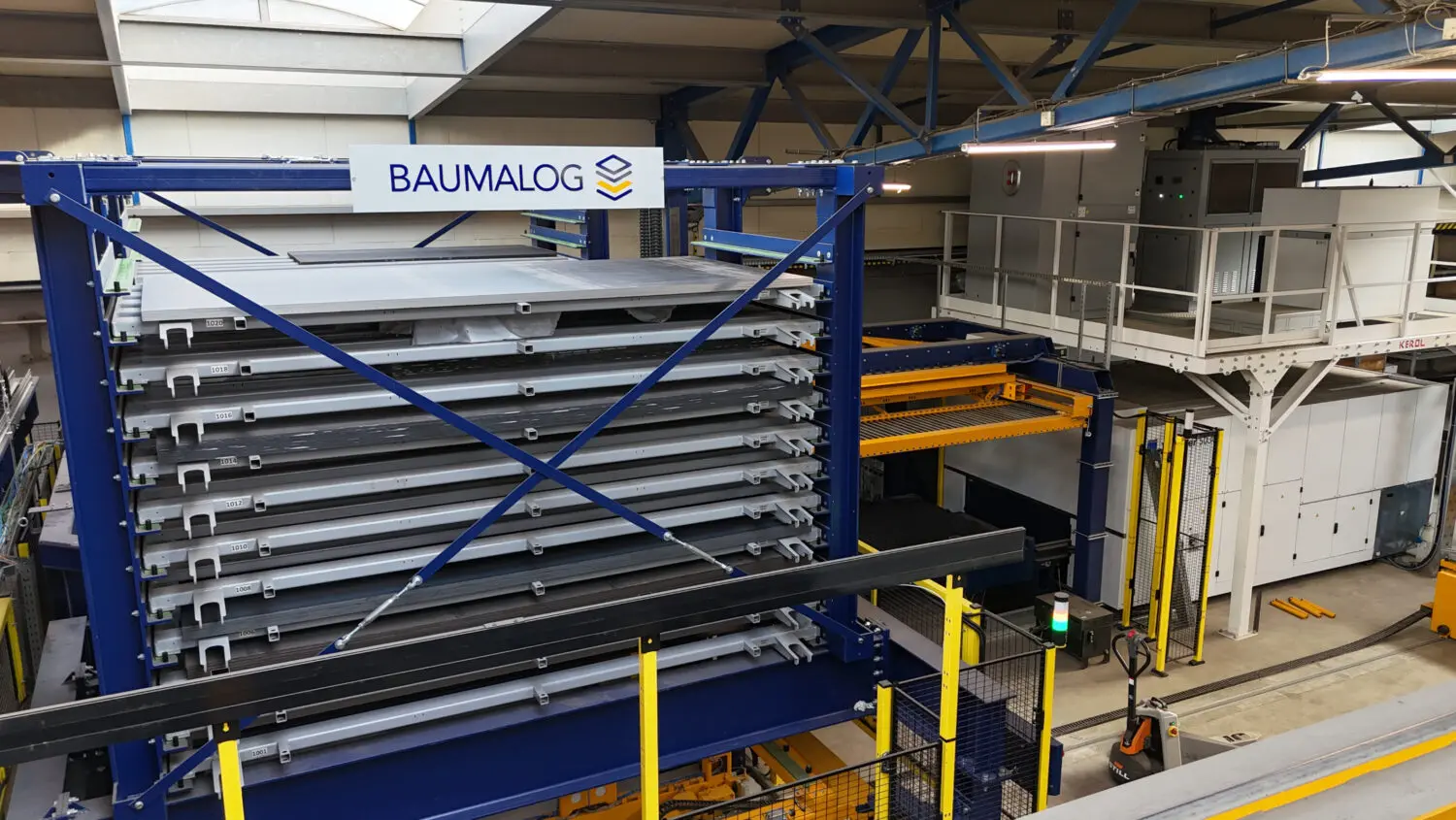
Dual automation of two TRUMPF laser cutters
Automation of two TRUMPF laser cutters using Loader 3015 and MultiLoader systems with a TwinTower automated storage system at Marbo Sport.
The laser cutter does not wait for the the operator
Loader takes over loading and unloading the table of one laser cutter. The laser automatically moves on to the next sheets, while the operator prepares material and sorts cut parts independently of the machine's rhythm.
3 versions
Standard, Extended and Cross
3 formats
3015, 4020 and 6020 mm
up to 6 m
sheet length
1 laser cutter
automatically
The biggest loss is not cutting speed, but unused laser time
A laser cutter works faster than a person can change sheets and remove cut parts. Every cycle ends with a break in which the machine waits for material.
Sounds familiar?
More sheets cut in the same working time
Automatic sheet exchange reduces the time between programs and allows production without an operator constantly at the machine.
The laser does not wait for a manual sheet change
Loader picks up the next sheet and removes the cut one while the machine is still working, so the next program starts right after the previous one ends.
The operator works independently of the machine's rhythm
Removing and sorting parts from the previously cut sheet takes place in parallel with cutting, outside the laser cutter table area.
Work without constant presence at the laser cutter
The system runs successive cycles within the prepared pickup and put-away locations, so the operator does not have to take part in every sheet change.
A repeatable and predictable cycle
Automatic sheet separation, single-sheet pickup check and thickness measurement reduce downtime caused by loading errors.
A first level of automation ready for expansion
Loader can be implemented at an existing laser cutter and, in the next stage, connected to an automated sheet metal storage system without changing the whole concept.
The full sheet path handled in parallel with the laser
Loader takes the sheet from the prepared pickup point, through the laser cutter table, to the put-away location for cut material. What matters is not only the sequence of operations, but that cutting, material transport and part sorting happen at the same time.
1. Material preparation
Sheets are placed at pickup points served by the Loader. Material can be prepared in advance, regardless of what the laser cutter is currently doing.
2. Sheet pickup and check
The system takes a single sheet from the stack. Sheet separation, single-piece pickup check and thickness measurement confirm that the right material goes onto the table.
3. Loading onto the laser cutter table
The sheet is placed on the laser cutter's shuttle table. Loading takes place without the operator, right after the table is released by the previous cycle.
4. Cutting
The laser cutter runs the program according to the prepared queue. Meanwhile, the Loader can prepare the next sheet or put away the previous one.
5. Unloading the cut sheet
The cut sheet is removed from the table immediately after the program ends, so it does not block the start of the next task.
6. Put-away in a designated place
After cutting, the material goes to the designated put-away location. Parts are removed and sorted there, outside the laser cutter's rhythm.
Three processes at the same time
The laser cuts, the Loader moves material and the operator sorts the previously cut sheet. Separating these three processes is what really increases the number of sheets cut, not just speeding up a single operation.
What needs to be planned
Loader works within the prepared material locations. How long it can run unattended depends on the number of pickup points and places for cut sheets, which is why we design the layout of these locations together with the system.
Three Loader versions matched to your hall layout and work organization
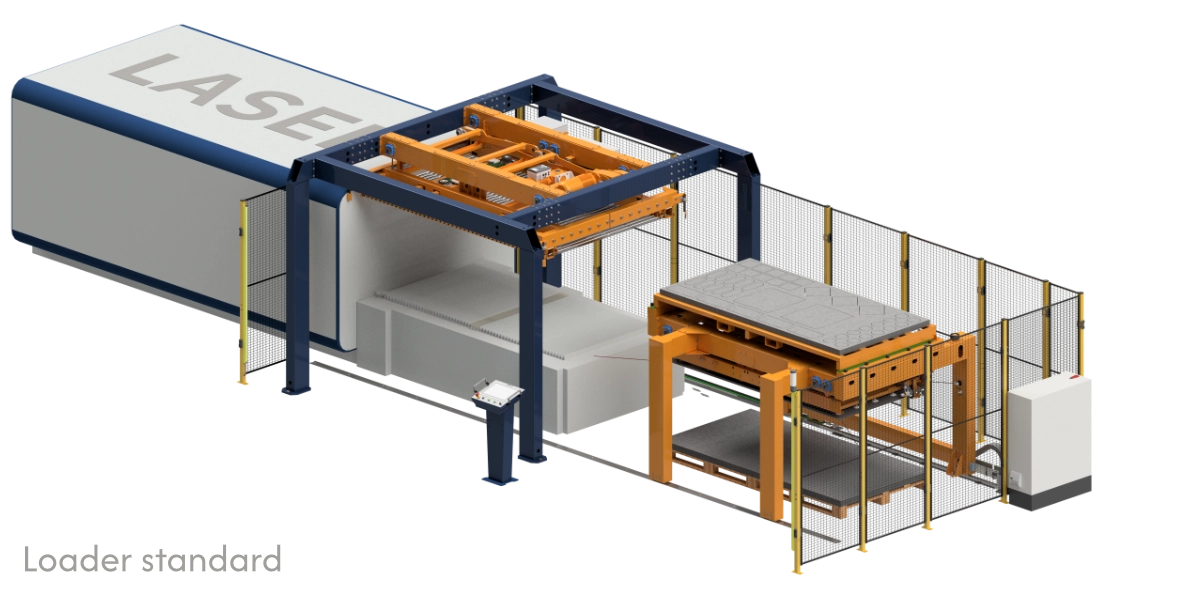
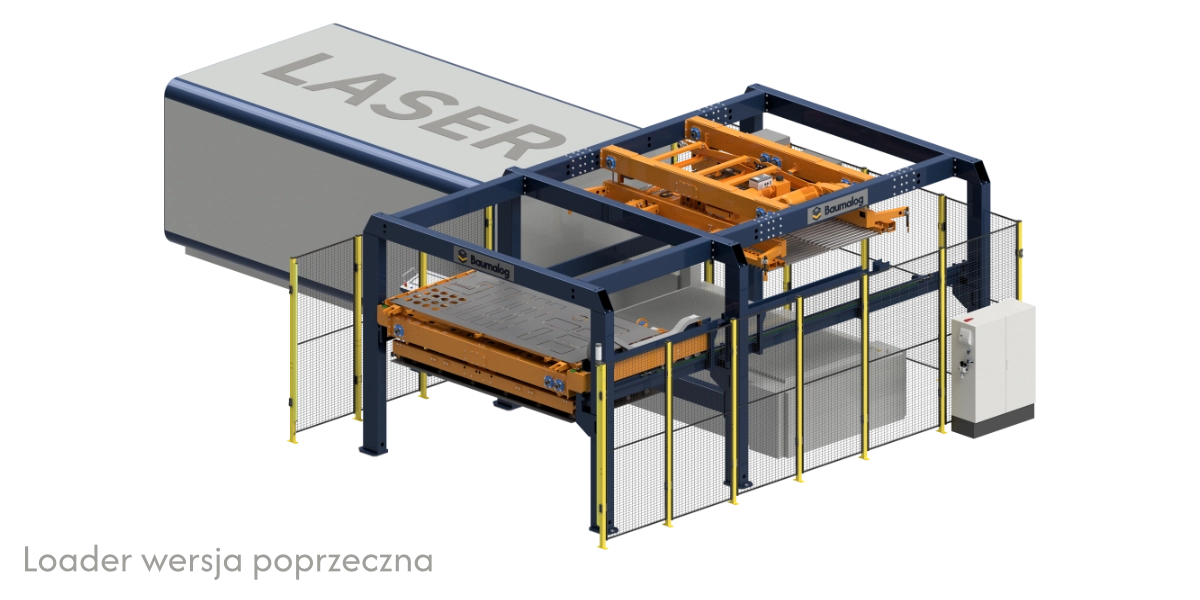
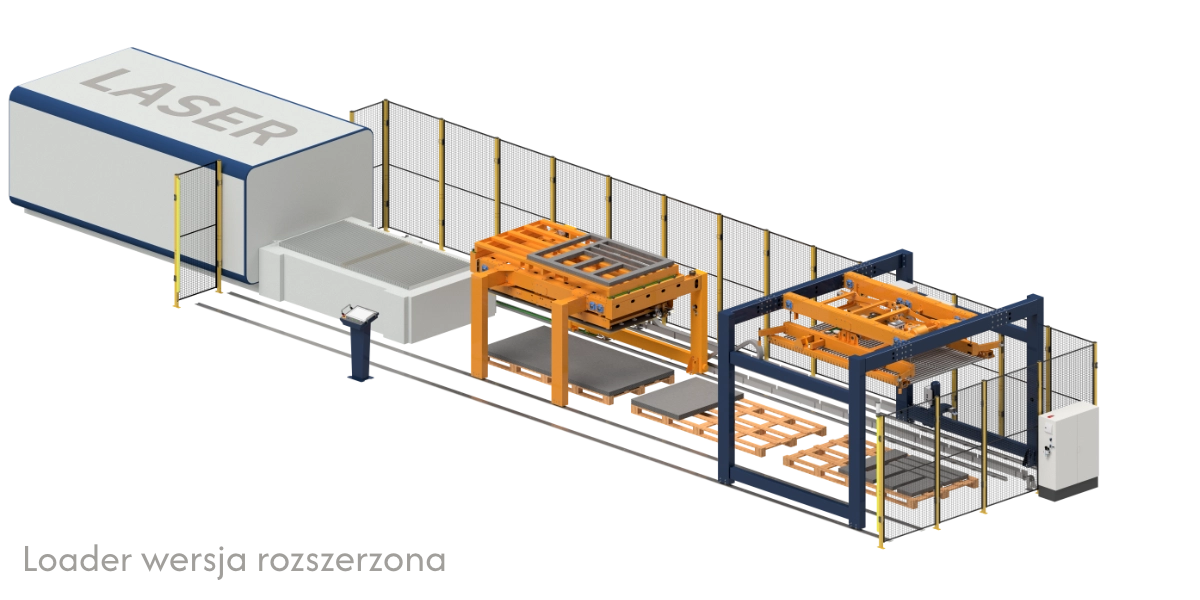
Loader is available in three versions: Standard, Extended and Cross. The choice depends on how the laser cutter is positioned, the space available around the table and the number of pickup and put-away locations the system has to serve.
| Sheet format | Shelf load capacity | Maximum stack height |
|---|---|---|
| 3000 × 1500 mm | 3000 kg | 90 mm |
| 4000 × 2000 mm | 5000 kg | 90 mm |
| 6000 × 2000 mm | 5000 kg | 53 mm |
Laser cutter work plan, queue and execution control
We can supply the full Flower software with every automation system. The operator sees the task queue, execution status and situations that need a response, and the work plan for one laser cutter can be prepared in advance.
Program import and task queue
Programs from CAD/CAM go into a shared laser cutter queue. The task order can be planned in advance and changed during the shift.
Material, source and put-away location
For each task, the type of material, pickup location and destination of the cut sheet are defined.
Process control and execution history
The system shows execution progress and situations that require the operator's response, and records the history of completed tasks.
Modules chosen for the scope of the project
Depending on the project scope, Loader works with the Flower Plan or Flower Pro modules, and when connected to a storage system, also with Flower Store and Flower Link.
Plan ready in advance, material in place
With the Loader alone, the plan can be prepared in advance, but material has to be physically delivered to the served locations. Automatic access to different materials only comes with a connection to a storage system.
One Baumalog software ecosystem
The same environment supports sheet metal storage systems, laser cutter automation and larger production systems: expansion does not mean changing software.
Proven integrations with laser cutters from various manufacturers
Baumalog automation is not tied to one machine manufacturer. We adapt the Loader to the specific laser cutter model and connect the IT layer with the systems already running in the plant.
Laser cutters of many brands
We have implemented automation on lasers of different manufacturers, generations and formats. Each project is a proven exchange of signals and data with a specific machine.
A new machine brand
Integration is possible if the laser cutter provides an API or interface for exchanging the required data and signals. We start by analyzing the interface of the specific machine.
CAD/CAM
We import programs prepared in the CAD/CAM system into the laser cutter queue together with information about the required material.
ERP, MES and higher-level systems
Orders, material stock levels and execution feedback can be exchanged with higher-level systems running in the company.
A new or an existing laser cutter
Loader can be designed together with a new machine or added to a laser that has been working in the hall for years.
Scope agreed before the project
Before work starts, we agree which data and signals need to be exchanged between the Loader, the laser cutter and IT systems: this defines the real scope of automation.
Automation without losing access to the laser cutter
Automation must not block table cleaning, grid replacement, service or an urgent job outside the queue. We design the Loader modules so that the laser remains available for manual work too.
In practice, this means that:
A first step that does not close the way to further stages of automation
Loader is the first level of laser cutter automation. The system can be expanded without changing the whole concept, most often towards an automated sheet metal storage system and then an integrated production system.
More material locations
Additional pickup and put-away locations extend the time the system can work without operator intervention.
Longer track
Extending the track increases the number of served locations and the Loader's working range in the hall.
Adding an automated storage system
Connecting the Loader to a sheet metal storage system gives automatic access to different materials and allows the entire prepared queue to be processed.
Software development
Planning for one machine can be extended with material management and integration with higher-level systems, in the same Flower environment.
Mechanics, automation, software and integration from one partner
Laser cutter automation is not just a mechanical structure. Safety systems, control, software and agreeing data exchange with the specific machine and IT systems are just as important. We deliver this entire scope ourselves.
Automation independent of the machine manufacturer
We do not sell lasers: we automate the ones the customer has chosen. That way, the choice of solution is not limited to one brand.
Mechanics, automation and safety
We design and build the structure, control and safety systems as one whole, tailored to the specific workstation.
Our own Flower software
We develop the software layer ourselves, so scope changes, integrations and later expansion do not require bringing in more suppliers.
Designed for the specific hall layout
We choose the Loader layout, material locations and transport routes to suit the actual arrangement of workstations, not a catalog diagram.
See our working systems
The best proof is a production system that is actually working. See selected projects automating the loading and unloading of laser cutters.
Automation of two TRUMPF laser cutters using Loader 3015 and MultiLoader systems with a TwinTower automated storage system at Marbo Sport.
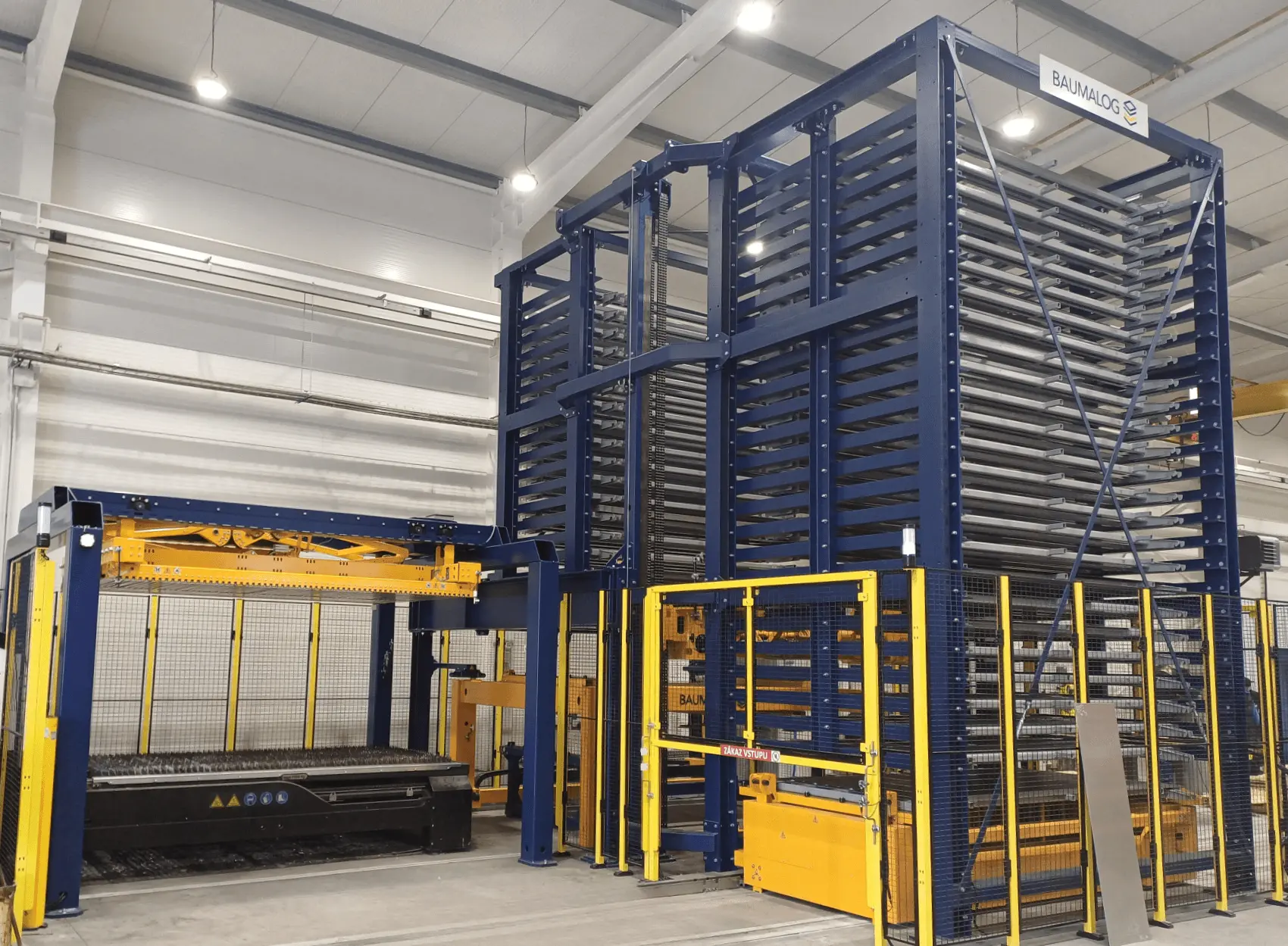
Automation of an Eagle laser cutter at R3Stav with a Loader system and a TwinTower automated storage system.
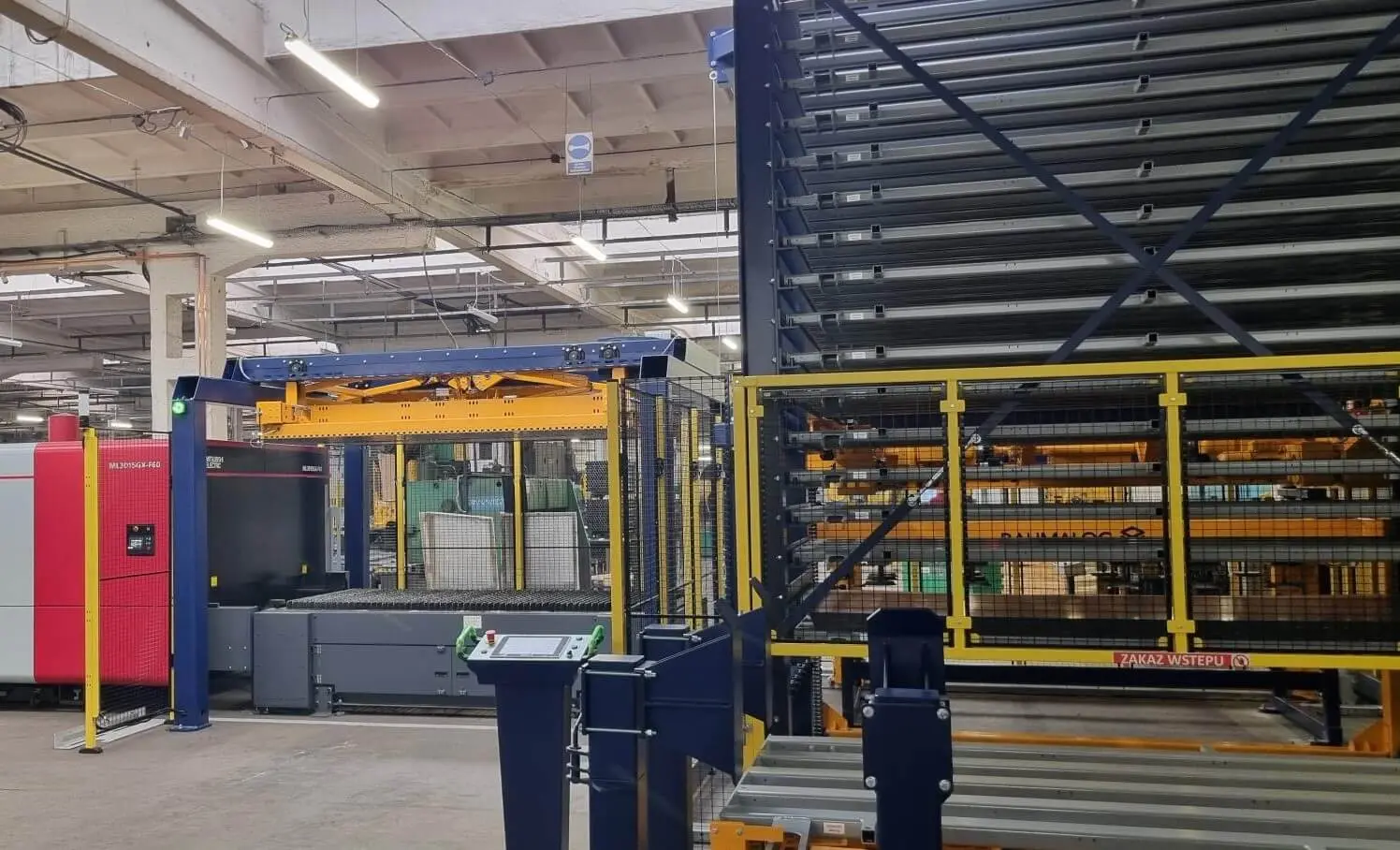
Automation of a Mitsubishi laser cutter at Altrad Montaż Sp. z o.o., a manufacturer of scaffolding and formwork.
Tell us about your process
We will select a solution tailored to your production.
160+ installations
Trusted by manufacturing plants across Europe.