Integrating an automated storage system with ERP. A compendium: what is really exchanged and who is responsible for what
See exactly what an automated storage system and an ERP system exchange with each other, what the typical scenarios are, where the real difficulty lies and who is responsible for what in such a project.

Baumalog
17 / 11 / 2026
In every conversation about an automated storage system, sooner or later the question comes up: “will it get along with our ERP?”. Behind it there are usually three concerns. That it is technically impossible. That it will take months. And that nobody knows who is actually supposed to do it: the storage system supplier, the ERP vendor or in-house IT.
Here we answer all three. We show what data travels between the systems, what the two basic modes of cooperation are, what gets more complicated with sheet metal and profiles, and what is added when the storage system is part of automated cutting. We also describe the division of roles and the reason why such projects take longer than the technology alone would suggest.
We start in general terms, because the way an automated storage system is integrated with ERP depends very little on the machine manufacturer. One supplier supports more, another less, interfaces differ in the details, but the processes and the data exchanged are similar everywhere. We only show how these principles look in our Flower software toward the end.
1. What does “integrate” actually mean?
Most misunderstandings come from the fact that everyone sees something different in the word “integration”. The IT specialist thinks about the API, the warehouse worker about not having to enter the same thing twice, and the director about the stock levels matching. In reality, integration has three separate layers:
- The first is the process, that is, deciding which activities in the company are to go through the automated storage system, who initiates them, which ERP document corresponds to them and who is responsible for them.
- The second is the data: indexes, orders, confirmations, batches and units that the systems pass to each other. This is where you decide which fields are needed and which are unnecessary.
- The third is the technical exchange, that is, the channel through which the data flows: an API, files or tables in a database.
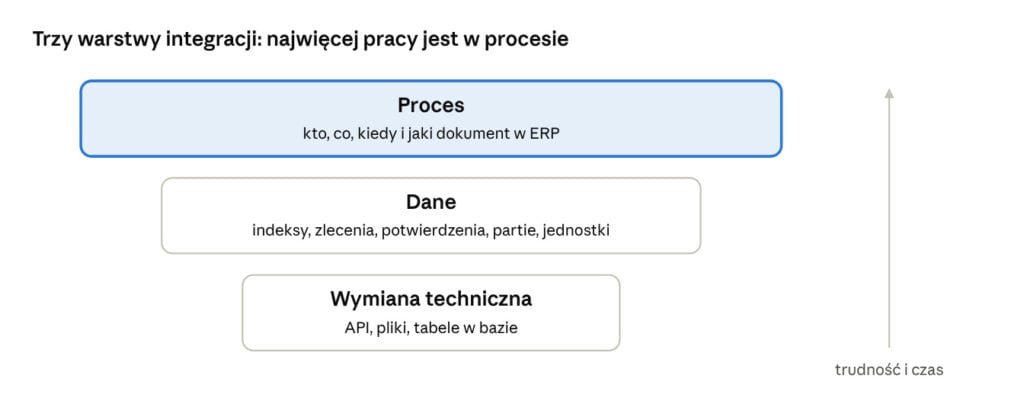
Integration talks usually start with the third layer, because it is the most concrete. Yet it is the one that causes the least trouble. The time and risk of the project sit in the first layer, followed closely by the second. That is why we go from the top: first the process, then the data, and the technology last.
2. Two operating modes: orders or direct control
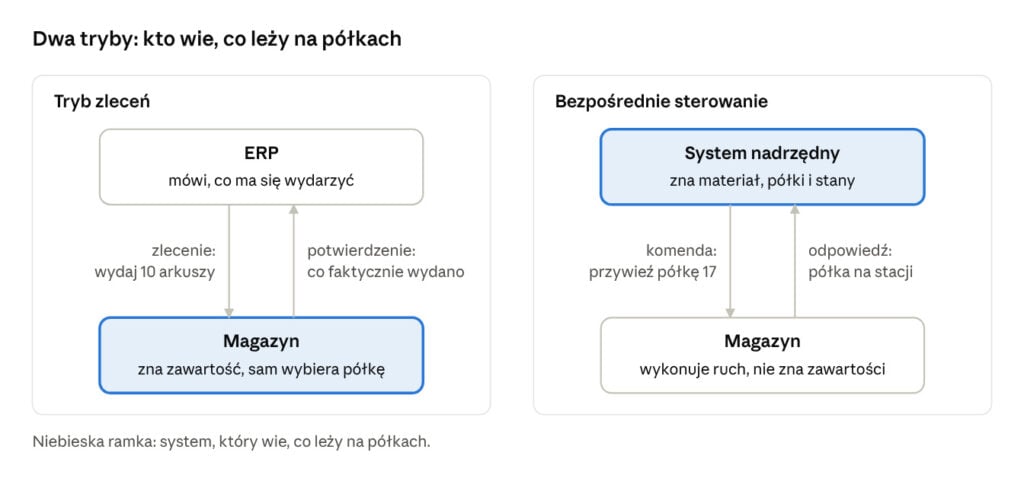
An automated storage system can work with a higher-level system in two fundamentally different ways. Choosing between them is the first and most important decision in the whole integration.
Order mode: the storage system knows what it holds
The higher-level system says what is to happen: “issue 10 sheets of index X”. The storage system software decides by itself how to do it: from which shelf, from which batch, in what order. The storage system keeps its own item master, knows the locations and stock levels, and after execution it reports back what it actually did.
This is the right mode for the vast majority of companies. The ERP does not need to know anything about shelves, load capacity or heights, and the storage system can keep working even when the ERP is temporarily unavailable.
Direct control mode: the storage system is the executor
The higher-level system issues a movement command: “bring shelf 17 to station 2”. The storage system does not know what is on that shelf. All the knowledge about material, locations and stock levels lives in the system that controls it.
This mode makes sense in two situations:
- The company has its own highly developed software and a well-organized process, so it needs a machine that executes commands, not a second warehouse system.
- The storage system is a buffer in a larger installation. For example, an integrator supplies a robot cell, there is a production-side rack next to it, and the whole thing is managed by that integrator’s software.
There is one catch: everything the storage system software does in order mode has to be done by someone else. Shelf load control, location selection, batch tracking and handling operator mistakes all move to the higher-level system.
Most manufacturers of automated storage systems, whether we are talking about sheet metal racks or vertical lifts for small parts, offer both modes under different names. From here on we deal with order mode, because it is the one that requires process agreements.
3. Three operations: put in, take out, count
An automated rack lets you physically do three things with material. It can put it in, that is, receive it onto a shelf. It can take it out, that is, issue it from a shelf. It can also count it: bring a shelf to check how much is really on it.
Everything else is derived from these. A transfer between shelves is a take-out and a put-in. Picking is a series of take-outs, and so on.
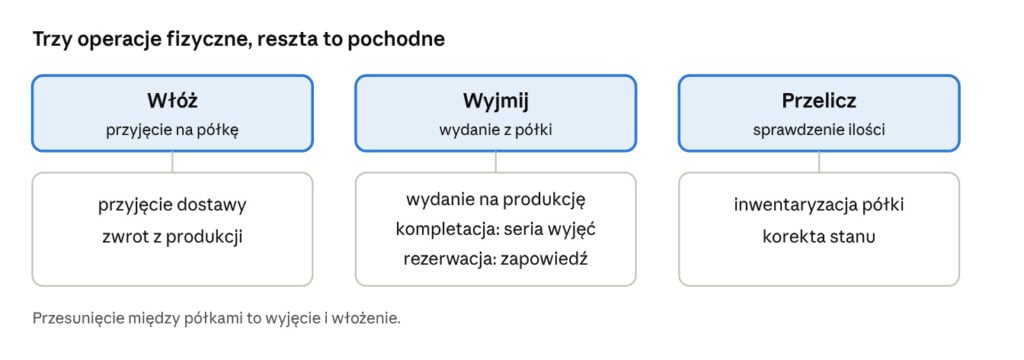
This simplicity has practical significance. An ERP system knows dozens of document types and warehouse operations. The job of integration is not to recreate all of them in the storage system, but to reduce each of them to one of the three physical operations. If during the analysis an operation comes up that cannot be reduced this way, it is a sign that it does not concern the automated storage system and should not be sent to it.
One reservation: putting in and taking out are ordered by the ERP, while counting usually starts at the machine. The operator counts the shelf, and the result goes back to the ERP as a difference.
4. The basic loop: order, execution, feedback
The core of every order-mode integration is two data streams.
Stream one: the item master
The storage system has to know what materials exist. The ERP owns the item master and is the one that sends indexes with their descriptions to the storage system. This is where the first surprise appears: an automated storage system needs data that the ERP often does not have or keeps in a description field. This means dimensions, thickness, grade, unit weight and sometimes the permissible stack height. Without them, the storage system cannot calculate the shelf load or convert kilograms into pieces.
Order also matters: an index has to reach the storage system before the first order that refers to it. An order for an unknown index will be rejected. It sounds trivial, but it is a typical cause of errors in the first weeks of operation.
Stream two: orders and confirmations
The actual loop runs in four steps:
- The ERP sends an order with a document number, an operation type (receipt, issue, inventory count) and line items, each giving the index, quantity and unit. It can also give the batch, priority, due date and destination.
- The storage system executes the order. The operator selects it at the machine or it is started automatically, and the storage system software selects the shelves and guides the operator.
- The storage system sends back feedback on what was actually done: how many pieces were issued, from which batch, who did it and when, and whether the order was completed in full.
- Based on the confirmation, the ERP creates or approves a warehouse document.
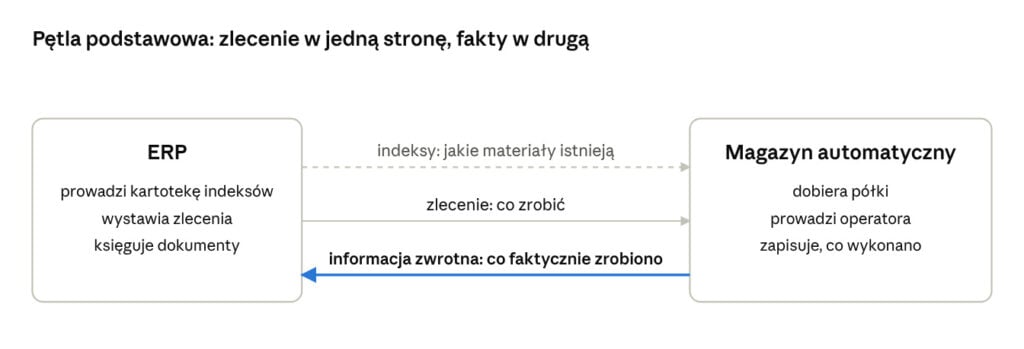
The key word here is “actually”. Feedback is not a simple “OK” but a record of what happened, and it may differ from the order: 8 were issued instead of 10 because there were no more, or material was taken from a different batch. The ERP has to be able to accept such a response.
And if the operator starts the operation?
Not every operation starts in the ERP. An operator walks up to the machine and takes a sheet because it is needed right now. The storage system will do this without an order and will send the ERP information about an operation the ERP was not expecting. You have to decide in advance whether the company allows this and, if so, what document should be created from such information and against which order or cost center.
5. Integration means mapping processes
The core of the analytical work is to identify the ERP operations that concern the automated storage system and translate each of them into one of the three physical operations. A typical result looks more or less like this:
| What happens in the company | Typical ERP document | Operation in the storage system |
|---|---|---|
| Delivery of material from a supplier | External receipt (PZ) | Put in |
| Issue of material to production | Internal issue (RW) | Take out |
| Sale of material | External issue (WZ) | Take out |
| Return of unused material | Return or internal receipt | Put in |
| Transfer to another warehouse | Inter-warehouse transfer (MM) | Take out or put in, depending on direction |
| Inventory count | Count sheet | Count. Usually started by the operator, with the difference going back to the ERP |
| Production order with a bill of materials | Reservation, then issue | Advance notice, then take out |
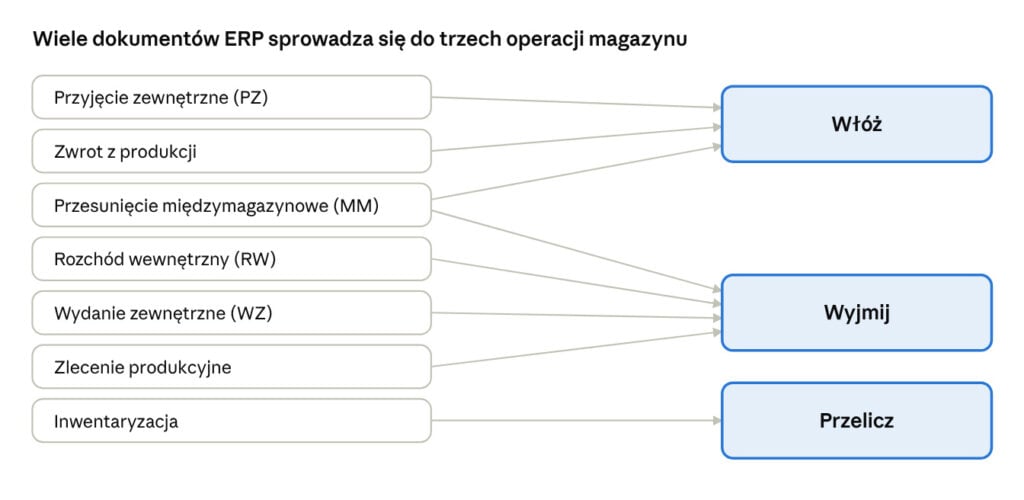
The table looks innocent, but for each row several questions have to be answered:
- Is the document created before the operation, as an order to be executed, or after it, as the result of a confirmation from the storage system?
- Is the operation started by the ERP, by the operator at the machine, or are both routes allowed?
- What happens when execution differs from the order? Is the document corrected, split, or does it wait for completion?
- Who can cancel the operation, and up to what point?
These questions are answered neither by the storage system supplier nor by the ERP vendor, but by the company, which knows how it wants to work. Suppliers can show typical solutions and their consequences.
6. Less is more: filtering data
The natural reflex is: “let’s send everything to the storage system and let it pick what it needs”. That is a straight road to trouble. The ERP of a medium-sized manufacturing company has tens of thousands of indexes, of which a few hundred are in the sheet metal rack. It also has hundreds of open documents a day, of which a dozen or so concern the automated storage system.
Good integration limits the data stream at three levels:
- Only indexes of materials that can physically end up in the storage system are sent to it. A material group or an additional flag on the index is usually enough for this.
- Only the document line items that concern this particular storage system are sent to it. A document with twenty line items may result in two items for the automated storage system and the rest for the conventional warehouse.
- The storage system receives the dozen or so fields it needs, not the entire ERP record, because every additional field has to be maintained on both sides.
Filtering should take place on the ERP side, because only the ERP knows what is where in the accounting sense. The simplest and most common way is to set up the automated storage system as a separate logical warehouse in the ERP. Then the question “does this concern the automated storage system?” has a clear answer already at the document level.
The effects of not filtering are predictable: the operator at the machine scrolls through a long list of orders, most of which do not concern them, and every change in the ERP item master triggers a wave of unnecessary updates.
7. Who is the source of truth about stock
After integration, stock levels live in two systems. If you do not decide which of them is right about what, sooner or later there will be a dispute about “how much there really is”.
A proven division is simple. The ERP is the source of truth about quantity and value in accounting terms, that is, how many kilograms of a given index the company owns and how much they are worth. The storage system is the source of truth about physical placement: it knows which shelf the material is on, how many pieces there are, which batch they come from and what condition they are in.
The ERP does not need to know shelf numbers. The storage system does not need to know prices. Each system handles what it was built for.
Stock levels will always drift apart at some point
Even with a well-built integration, stock levels in the two systems start to differ over time. The reasons are mundane: someone took material outside the system, a document in the ERP got stuck unapproved, rounding in unit conversion adds up after hundreds of operations.
That is why integration should provide for stock reconciliation from the start: a periodic comparison of what the ERP sees with what the storage system sees, and a clear procedure for dealing with differences. This is what the third operation from section 3, counting, is for. The rack brings the shelf, the operator counts, and the result goes to both systems.
A simple technical rule also helps: some data is better sent as the current state rather than as individual changes. If a change message is lost, the discrepancy remains for good. If a state message is lost, the next one fixes the situation by itself.
8. The details that eat up time: batches, units, exceptions
The basic loop can be launched relatively quickly. The rest of the time goes into three topics.
Batches, certificates, heats
If the company tracks the origin of material, the batch has to go through the entire loop. On receipt, the ERP passes on the batch, certificate or heat number. The storage system remembers which batch is on which shelf. On issue, there are two options: the ERP specifies a particular batch, or it leaves the choice to the storage system and learns from the feedback which batch was issued.
The second option is simpler and usually better. The first is sometimes necessary when the end customer requires the entire order to be made from a single delivery.
There is a trap here that few people think about in advance: each system understands the word “batch” differently. For the ERP, a batch is usually an index and a number. The storage system has to distinguish more, because two deliveries with the same number may have a different heat, certificate or sheet weight. One number from the ERP may therefore mean several batches in the storage system. You need to decide how the systems recognize that they are talking about the same material.
Units: kilograms versus pieces
This is the most common source of problems with sheet metal and profiles. The ERP keeps steel in kilograms, because that is how it is bought and valued. Nobody at the machine thinks in kilograms: the operator takes three sheets or five profiles.
So a conversion factor is needed, and this is where things get tricky. A sheet of known dimensions has a theoretical weight calculated from the density, while a delivery from the mill has a weight from the document, which is almost never the same. After all the sheets have been issued, the ERP is left with a few kilograms that do not physically exist, or the stock drops below zero.
The conversion factor should also live in one place. If both the ERP and the storage system convert, each a little differently, differences are guaranteed. With profiles, a third unit comes in as well: meters. A full-length bar has a length, a shorter piece remains after cutting, and the ERP still wants kilograms.
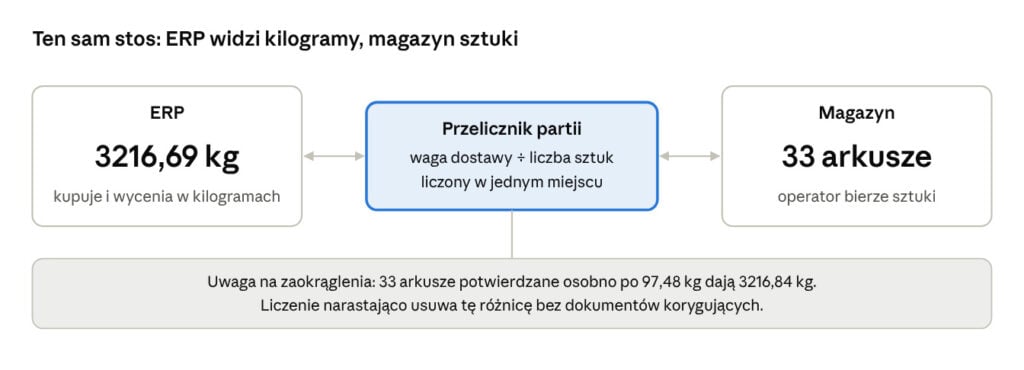
The most common solution: the storage system works in pieces and sends the ERP the quantity converted into kilograms. The sheet weight is determined separately for each batch by dividing the weight from the delivery document by the number of pieces. After the entire batch has been issued, the kilograms in the ERP then go down to zero.
That still leaves rounding drift. The ERP usually calculates to two decimal places, and a sheet weight is rarely that round. Example: a batch of 33 sheets weighs 3216.69 kg. If each sheet is confirmed separately with a rounded weight, the total will be 3216.84 kg, and the ERP will show 150 grams of steel that does not exist.
A proven method is cumulative calculation. Each confirmation carries the difference between the rounded total of the issues so far and what has already been confirmed. The deviation is spread across the regular confirmations, the last issue closes the batch and no correction documents are created. This rule has to be agreed before startup, not after the first inventory count.
Exceptions
When everything goes according to plan, integration is simple. The work starts with the deviations:
- An order for 10 pieces, and there are 8 on the shelf.
- The operator interrupted execution halfway through.
- The order was canceled in the ERP while the shelf was already on its way.
- More was received than was on the delivery document.
- The ERP was unavailable when the storage system wanted to send back a confirmation.
- The same order arrived a second time.
For each of these situations, the behavior of both systems has to be agreed. The list is not long, but it is what shows the difference between an integration that works in a presentation and one that works on the third shift.
9. FIFO and other strategies
Asked about the issuing strategy, almost everyone answers: FIFO. The oldest material is supposed to go out first. That is a reasonable assumption, but it has its cost, and in some situations other strategies work better.
A stack is physically LIFO
Sheets on a shelf lie one on top of another. The one on top, that is, the most recently placed, is accessible. If a new delivery goes onto a shelf that already holds an old one, the old one is underneath and will come out last.
That is why a simple rule is used for raw sheets before cutting: one batch, one shelf. FIFO then comes down to choosing the shelf with the oldest batch and works without exceptions. It costs some capacity, because shelves are sometimes not full, but the order is worth the price.
The rule does not cover usable scrap or cut sheets put away in stacks. There, batches get mixed, because there are too few pieces from one batch to give each its own shelf.
The reason for this rule is not technical. Software can easily remember that the third sheet from the top comes from a different delivery than the fourth. The person standing at the stack who has to take the right sheet will not remember it. A mixed stack of raw sheets is a ready-made recipe for a batch mix-up, and with certified material such a mistake is very costly.
Strategies that come from how the storage system works
An automated storage system has its own reasons to choose a shelf other than the one with the oldest batch:
- If the right material is on a shelf that is already in the station, taking it from there takes seconds, while a trip for the oldest batch is an extra cycle.
- In automated cutting, the time it takes to deliver a sheet to the table matters, so a shorter route means shorter laser downtime.
- Taking from a shelf with two sheets left frees up space for a new delivery.
- If a part fits on usable scrap, that is, a piece left over from earlier cutting, it is better to use it up than to start a full sheet.
- When an order requires a specific certificate, the specified batch decides the choice and the strategy has no say.
One rule follows from this for integration: the ERP should not specify the shelf. If it has to specify something, let it be the batch. In all other cases, the choice belongs to the storage system, and the ERP learns about it from the feedback.
10. Several automated storage systems and an external WMS
With one rack, things are simple. They get complicated when there are several automated storage systems or when a separate warehouse management system sits between the ERP and the machines.
Order batches
When one system manages several racks, it pays to send orders in batches rather than one by one. The reason is physical: a rack needs time to bring a shelf. If the software knows the whole batch, it can start several racks at the same time. The operator finishes taking material from the first and moves on to the second, where the shelf is already waiting.
With orders sent one at a time, this gain disappears. Every retrieval starts with waiting.
When a general WMS is in control
Some companies have a separate WMS that handles the entire warehouse: pallet racks, forklifts, picking. The natural idea is to connect the automated storage systems to it as well. This works, provided you remember one thing: a general WMS usually does not know their specifics.
For a WMS, a location is a location. It does not know that a shelf has a load capacity and a permissible load height. It does not know that a rack handles one shelf at a time and that the order of orders determines the time. It does not know that two retrievals from the same shelf are best done in a single delivery of that shelf.
The result: the WMS sends correct orders in a sequence that, from the storage system’s point of view, is sometimes the worst possible.
The rule is the same as in section 2: the higher-level system says what, the storage system software decides how and in what order. The more the WMS tries to manage the details of the automated storage system’s work, the more of its logic has to be recreated in the WMS.
11. The exchange layer: API, files, databases
Only now do we get to where conversations usually begin. Data between the ERP and the storage system can flow in three ways:
- Through an API, the systems call each other’s web services, nowadays most often in the form of a REST API. The exchange takes place in real time, and every call gets a response immediately.
- With file exchange, one system writes a file to a shared folder and the other reads it. It is an old, simple and still popular solution, especially with older ERP systems.
- With intermediate tables, both systems read and write records in shared tables in a database. This route works well where the ERP can access a database more easily than web services.
Each of these routes carries exactly the same information: indexes, orders, confirmations. The choice depends mainly on what the ERP can do and what its implementer is comfortable with.
This really is the simplest part of the project. Even so, it gets the most attention, because it is easy to describe in a request for quotation: “do you have a REST API?”. A “yes” says little about whether the integration will succeed.
More important than the channel itself are the answers to four questions:
- Does each side know that the other has received a message?
- Is it certain that the same order sent twice will not be executed twice?
- If the other side fails, do messages wait in a queue and get delivered once the connection is restored?
- Can a person without programming knowledge check what was sent, what was received and what got stuck?
12. When cutting comes in: cutting orders and reservations
So far, the storage system has been a place that material leaves and returns to. When the rack is connected to a laser cutter and automatic loading, a cutting automation system is created, and that changes one fundamental thing: the system knows what is being cut and for what. A sheet does not disappear after being issued. It goes to the table, is cut with a specific program, and then returns to the storage system or goes for unloading.
The assumptions remain the same: you can still take out and put in. Between taking out and putting in, however, production takes place, and that opens new threads in the ERP integration.
A third system at the table
So far, two systems have been talking: the ERP and the storage system. With cutting, a third one comes in: the CAD/CAM software or the cutting management system in which programs and nestings of parts on sheets are created. It has its own data and often its own exchange channel. The integration stops being two-way, and you have to decide which system tells what to whom.
Two types of cutting orders
The ERP no longer sends “issue 10 sheets”. Instead, it orders cutting, and it can do so in two ways:
| Parts order | Program order | |
|---|---|---|
| What the ERP orders | Specific parts and their quantities | Running a specific cutting program a set number of times |
| Who knows what it will be made from | The automation system: it finds programs containing these parts by itself | The ordering party: the program is specified, and the batch and certificate of the material can be specified too |
| When the order is complete | When the parts have been cut and sorted | When the sheet has been cut |
| For whom | Companies that want to track production down to the individual part | Companies that plan cutting outside the automation system and need an executor |
In both cases, tasks in the laser cutter plan are created automatically, with a reference to the order from the ERP. Nobody retypes the queue by hand, and after execution you know which order was completed and to what extent.
Material for the plan: reservations
Since the system knows the cutting plan, it also knows the material that plan requires: grade, thickness, format, number of sheets. It can therefore reserve material for specific tasks or programs before someone issues it for something else. It can also show a shortage in advance, so the planner sees that there will not be enough sheets for the planned cutting before the laser cutter stops. An ordinary storage system can do none of these things.
A reservation can be hard or advisory. A hard reservation rejects the order when there is no material. An advisory one lets planning continue and only signals the shortage. This is a process decision: should the plan stop at the missing material or skip it?
13. Production accounting: the sheet turns into something else
In an ordinary warehouse, what comes in is the same as what goes out. With cutting, this is not the case. A raw sheet goes into the process, and three things come out of it. The first is parts, the reason for cutting in the first place. The second is usable scrap, a piece of the sheet large enough that something else can still be cut from it. The third is scrap, that is, the skeleton and offcuts.
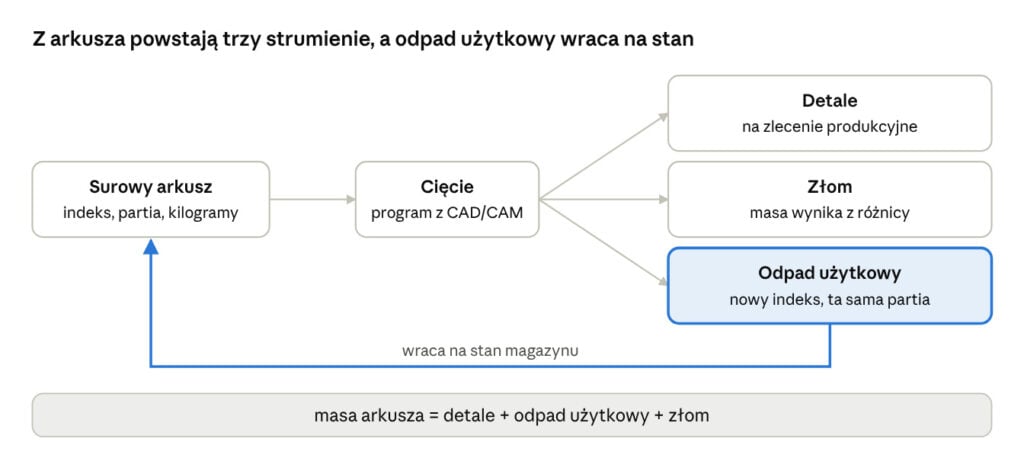
The ERP wants to account for this, usually in kilograms. In the simplest approach, this means three postings: consumption of raw material, receipt of parts or semi-finished products, receipt of usable scrap. The mass of the scrap is the difference.
Where the data comes from
The automation system knows which sheet was cut with which program. The cutting program, prepared in CAD/CAM, contains a list of parts with quantities, and most often also their masses and the sheet utilization rate. Combining these two sources gives the complete picture: from a sheet with index X and batch Y, so many parts with a total mass of Z were produced.
These masses are calculated, not weighed. The sheet mass comes from the batch weight, the part mass from its unit weight, and the scrap mass is the difference. This is enough for accounting, but you should not expect it to match the weight of the scrap container.
Usable scrap
This topic is rarely thought through in the ERP before implementation. A piece of sheet left after cutting is fully valuable material, but it has different dimensions than the sheet it came from. The questions to settle are:
- Does usable scrap have a separate index in the ERP, or the same index with a different number of kilograms?
- Does it inherit the batch and certificate from the parent sheet? If the company tracks origin, it must.
- How is it valued?
- From what size is a piece usable scrap rather than plain scrap?
The storage system needs to know the dimensions of the usable scrap to know what will fit on it. The ERP needs its mass. This is another place where two units meet.
In practice, usable scrap is created during sorting. The operator enters the dimensions of the rectangle they are keeping and the shelf they are putting it on. This is one of the cases where the new index is created by the storage system, not the ERP. So you need to decide whether and how the ERP is to learn about it.
How deep to account
Not every company needs full accounting. In practice, there are three levels:
| Level | What goes back to the ERP | For whom |
|---|---|---|
| Basic | Raw material consumption: which sheet, how many kilograms, for which order | Companies that account for parts separately, at later stages |
| Extended | Raw material consumption plus receipt of usable scrap | Companies that care about the true stock of material |
| Full | Consumption, usable scrap, completed parts with quantities and a link to the batch | Companies with a requirement for full traceability |
It is best to start with the level the company can handle on the ERP side and expand it later. The data on the automation side is collected anyway.
14. Automated sheet metal picking
The second extension is picking: automatically taking individual sheets from different shelves and placing them on one carrier. It is used to prepare a set of material for a production order or for shipment to a customer.
From the integration side, things are simple: a picking order comes from the ERP. It has many line items, for example three sheets of one index, five of a second and two of a third. Each item can allow any batch or specify a particular one.
The difference lies in what happens next. The storage system does not issue these sheets one after another; it builds a stack from them: it takes individual sheets from the source shelves and places them on one picking shelf. Only the finished stack is retrieved from the storage system, as a whole, in one movement.
So the order says what is to be in the stack. The storage system software decides how to build it: in what order, with what separator sheets, on how many shelves. Only the software knows the height and weight limit, so it is the one that can split one order into two stacks.
Building stacks results in a two-stage completion that the ERP has to know about. A picked stack lies ready on the shelf, but the material is still in the storage system’s stock. A retrieved stack has left the storage system, and only then does the stock decrease. Several hours can pass between the two. The issue document in the ERP should therefore be created when the stack is retrieved, not when it is built.
The feedback to the ERP contains the same as with a regular issue, that is, the quantities and the batches actually taken for each line item, plus an indication of what is in which stack.
15. Who does what: three parties at the table
A common expectation is: “the storage system supplier will integrate it with our ERP”. In practice, it looks different, and it is good that it does.
The storage system supplier does not touch the ERP system. The reason is simple: the ERP is the company’s core software. It contains finance, sales, HR and production. No sensible company lets machine people into it, and no sensible machine supplier wants to go in there.
So every integration involves three parties:
| Party | Responsible for |
|---|---|
| The company | Process decisions: which operations go through the storage system, who initiates them, which documents are created, how differences are settled. Master data: indexes, dimensions, conversion factors. |
| The ERP vendor or implementer | Everything on the ERP side: sending orders and indexes, receiving confirmations, creating documents, filtering data. They are the ones who connect the ERP to the storage system interface. |
| The storage system supplier | Providing and documenting the interface. Support in process mapping. Adjustments on its side of the interface when the process requires it. Testing and commissioning on the storage system side. |
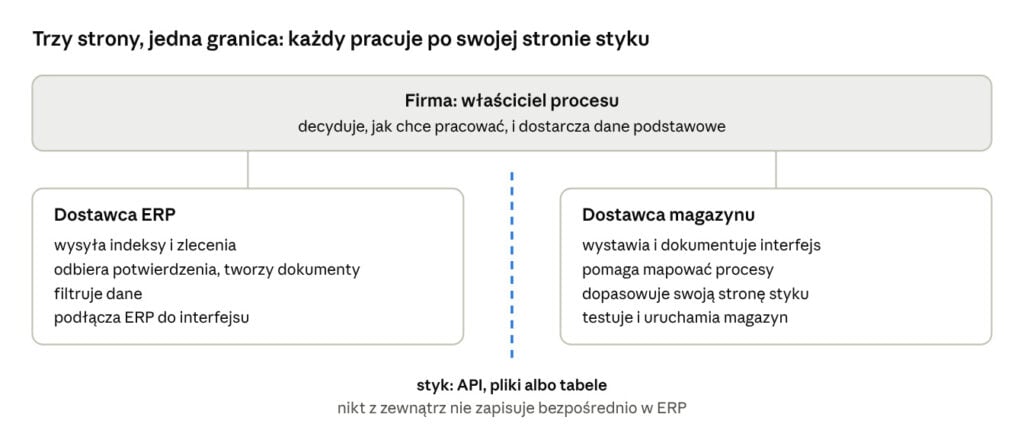
The storage system supplier does not “integrate with the ERP”. It provides the interface, helps lay out the process and adapts its own side. The connection is made by whoever knows the ERP and is responsible for it. There is sometimes more and sometimes less work on that side, but there is always some.
In large projects, the boundary is sometimes shifted. The storage system supplier then prepares the exchange in a format the ERP already knows, for example in an existing file layout, and takes over the unit conversion. The principle stays the same: nobody from outside writes anything directly into the ERP.
Two practical consequences follow from this. First, the ERP implementer should be at the table from the start. If they learn about the project when the machine is already installed, the schedule has just gotten longer. Second, the cost on the ERP side has to be included in the budget. It is not in the quote for the storage system, because the storage system supplier is not able to price it.
16. Why it takes time
Storage system integrations with ERP can drag on for months. It is easy to assume that difficult technology is to blame. It is not.
The data exchange itself and field mapping are a small part of the work. The project takes time because integration is usually the first moment when the company starts really thinking about its warehouse process. As long as material lay on cantilever racks and the operator took it because they “knew what to take”, nobody had to answer the questions from section 5. An automated storage system and its software force the answers.
These answers lead to changes that are not directly related to the machine:
- It turns out, for example, that the ERP keeps sheet metal only in kilograms and the indexes have no dimensions, so the item master has to be cleaned up.
- Until now, the operator took material on their own, and now a retrieval is a document that someone issues and someone approves. The responsibilities of several people change.
- In the ERP, the automated storage system has to be set up as a separate warehouse, the stock moved into it and the transfer rules defined.
- Since material can be reserved for an order, someone has to enter those orders on time, which changes the flow of production documents.
These are changes in the organization and in the ERP. Implementing the machine is the occasion for them, not the cause. They usually do the company good; it is just that nobody planned them beforehand.
How not to get stuck
A staged approach works best:
- At the start, the automated storage system works on its own, with its own item master. People learn the machine, and the company sees what the process really looks like.
- Then the basic loop is launched, that is, the exchange of indexes, receipt and issue orders, and confirmations.
- Finally, the details are added: batches, unit conversion, reservations and production accounting.
Each stage can be rehearsed as a dry run. The data exchange can be tested before the machine is installed in the hall: one side plays the ERP, the other plays the storage system and the operator. Mapping errors then come out at the desk, not at the first delivery.
The first stage is sometimes treated as a failure. Wrongly so. The machine earns money from day one, and integration decisions are made based on observation, not assumptions.
17. What it looks like in Flower software
Everything we have described above applies to automated storage systems in general. Below we show how these principles are distributed across the modules of our software.
| Module | Role | Which sections of the article it covers |
|---|---|---|
| Flower Store | Manages the storage system: indexes, locations, batches with certificate and heat, shelf weight and height limits, usable scrap. It works in pieces, meters or kilograms, and keeps the unit weight separately for each batch. | 3, 7, 8, 9 |
| Flower Link | It is the interface with the company’s systems. It receives indexes and orders, and sends back confirmations and a list of operations performed without an order. | 4, 5, 6, 11 |
| Flower Pro | Plans and queues cutting, links tasks to material, reserves sheets and posts their consumption. With a single laser cutter, this role is performed by the simpler Flower Plan. | 12, 13 |
| Flower Pick | Executes picking orders: builds stacks of sheets, plans the stacking order, separator sheets and the split across shelves. | 14 |
What exactly Flower Link exchanges
- Flower Link exchanges data via an API, files in exchange folders or intermediate tables in a database, and the operations are the same in every channel. The ERP implementer chooses the one their system handles most easily.
- An order is a receipt or an issue with a list of line items. After execution, a confirmation comes back with what was actually done: how much, from which batch and from which shelf. Until the ERP confirms receipt, the information waits.
- The batch can be chosen by the ERP or by the storage system. On issue, the ERP can specify a particular batch, certificate or heat, and without one the storage system goes for the oldest. You can also request a hard reservation and get an immediate answer as to whether the material is available.
- Retrievals and receipts performed by the operator without an order, as well as inventory count results, are not lost; they go to the ERP as a separate list of movements to be posted.
- A cutting order can concern parts, in which case the system itself finds the programs that contain them, or a specific program with a number of sheets and a specified batch. In both cases, tasks in the laser cutter plan are created automatically.
- Usable scrap goes back into stock as a new index with smaller dimensions and keeps the batch and certificate of the sheet it came from.
What we adapt in a project
Some of the things described here are not a setting in the software but the result of work on a specific process. In larger projects, we prepare, among other things:
- exchange in a file format the company’s ERP already knows, together with unit conversion and a record of every conversion;
- cumulative batch weight accounting, as mentioned in section 8;
- direct control of shelves by an external system, described in section 2;
- exchange with the cutting management system, covering schedules as well as program completion and shelf delivery events;
- a comparison of storage system stock levels with ERP stock levels, batch by batch.
The division of roles from section 15 applies to us as well. We document the interface, help map out the process and adapt our side of the interface where the company’s process requires it. The connection on the ERP side is made by its vendor or implementer.
As in section 16, the storage system can first work on its own, without integration, and be connected to the ERP later.
18. Checklist: questions before you start
The company answers most of the questions below itself. Some require a conversation with the ERP vendor. The sooner the answers come, the shorter the project.
For your own team:
- Which operations are to go through the automated storage system, and which stay outside it?
- Can the operator take material without an order from the ERP? If so, what does that produce?
- Do we track batches and certificates? On issue, is the batch chosen by the ERP or by the storage system?
- Do we adopt the rule of “one batch of raw sheet metal on one shelf”, and do we have the capacity for it?
- Will usable scrap have its own index, batch and valuation?
- Do we want to account only for raw material consumption, or for cut parts as well?
- Who on our side owns the process and makes the decisions?
For the ERP vendor:
- Can the automated storage system be a separate logical warehouse?
- Do indexes have dimensions, grade and unit weight in separate fields?
- In what unit is the material kept, and where should the conversion take place?
- Can the ERP accept a confirmation that differs from the order, for example with a smaller quantity or a different batch?
- Can it accept an operation it did not order itself?
- Which exchange channel is the simplest for the ERP: API, files or tables?
- Is there a test environment where the integration can be checked before go-live?
- Who on the ERP side will do the work, and when can they start?
Summary
Three things are worth remembering from this whole compendium.
First, the mechanism is simple and similar everywhere. The storage system can put in, take out and count, and integration is a loop made up of an order, execution and feedback, with the item master alongside.
Second, the difficulty lies in the process, not in the technology. API, files or a database are the smallest problem. The time goes on units, batches, exceptions and decisions about who is responsible for what.
Third, it is always the work of three parties. The storage system supplier provides the interface and helps lay out the process, the ERP vendor connects the ERP, and the company decides how it wants to work.
Planning an automated storage system and wondering how it will fit into your ERP system? Contact us. Usually a conversation about a few typical operations is enough to show what the data exchange will look like and where to start.