Integrating automation with a laser cutter. A compendium: what it really looks like step by step
See exactly what a laser cutter and an automation system exchange with each other, what cooperation scenarios are possible, what each of them gives you, which one we recommend and why.

Baumalog
24 / 08 / 2026
The question we hear in almost every conversation about cutting automation always sounds similar: “will it really get along with my laser?”. Behind this question there are usually three concerns. That it is technically impossible. That if something does not work, the laser supplier and the automation supplier will point at each other. And that the result will be a makeshift setup that works as long as nobody touches it.
This article answers all three. We show exactly what a laser cutter and an automation system exchange with each other, what cooperation scenarios are possible, what each of them gives you, which one we recommend and why. We also describe what we require from the other side, how long such an integration takes and who takes formal responsibility for it.
We deliberately do not go into the details of specific brands’ interfaces. Not because it is a secret, but because it does not matter for the investment decision: the mechanism is the same everywhere, and the differences come down to details that we take care of anyway. The article ends with a list of questions worth asking the laser cutter supplier before signing the contract.
1. Where integration concerns come from
Automation from the laser cutter manufacturer seems safer because “everything comes from one supplier”. In practice, however, it most often means being tied to one machine brand, a limited choice of storage configurations and no real management of material flow beyond the machine itself. If the plant has lasers from different manufacturers or the machine park is only going to grow, this route closes more doors than it opens.
The alternative, automation from an independent supplier, requires one thing: that the two systems learn to talk to each other. And that is the whole problem. It is not a magical or unpredictable problem. It is a process with its own stages, requirements, schedule and measurable duration.
Let us say the most important thing right away: for integration to be possible, the laser cutter must provide an interface for communicating with external automation systems. That is the only hard requirement. Practically every modern machine from a reputable manufacturer has such an interface, because laser manufacturers sell automation themselves and have to communicate with it themselves. The rest is a matter of agreement.
2. What “integrate” actually means: three layers
Most misunderstandings in conversations about integration arise because the people talking mean different things while using the same words. Integrating a laser with automation actually consists of three independent layers:
- Safety. Protecting the operator. Signals that guarantee nobody gets hurt in the working area of the connected machines. Implemented in hardware and subject to separate formal requirements.
- Control. The material exchange cycle on the laser cutter table and the mutual motion permissions that keep the machines out of each other’s way: who asks for what, who confirms what, and in what order.
- Data and planning. What is to be cut, from what material, in what order, on which machine and where it should go after cutting.
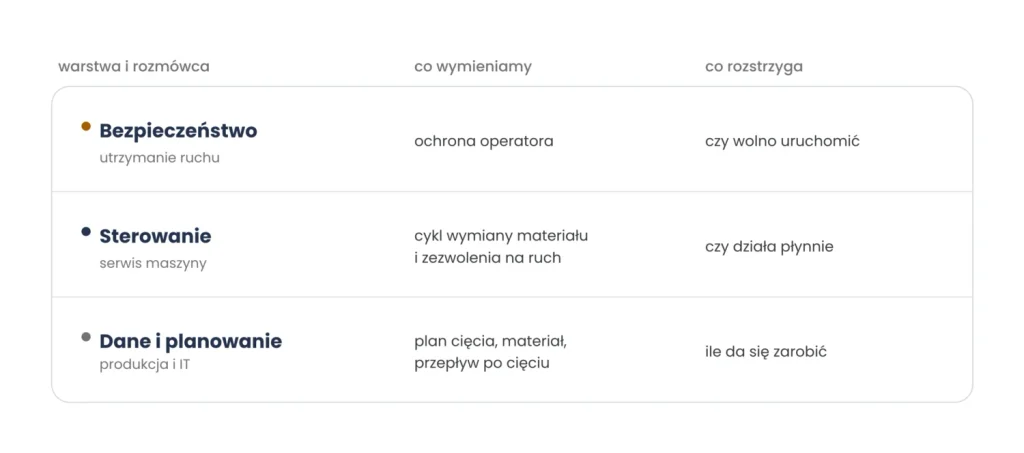
These three layers have different counterparts on the plant side: safety is maintenance and the automation engineer, control is machine service, and data is production and IT. They also have completely different consequences. The first layer decides whether the system may be started at all. The second decides whether it will run smoothly. The third decides how much money you can really make with it.
In the rest of the article we discuss them one by one.
3. MASTER and SLAVE: a glossary of terms everyone understands differently
In conversations with suppliers, the terms MASTER and SLAVE almost always come up. These are colloquial shortcuts that everyone understands a little differently. Usually the MASTER is taken to be whoever manages the cutting queue. But sometimes the MASTER is whoever requests material. As a result, two people can describe the same setup with two opposite words.
That is why we propose a different approach. In laser automation integration there are two independent axes, not one:
- The control axis: who initiates the material exchange cycle on the table. Does the laser ask the automation for material, or does the automation itself decide when to feed it?
- The planning axis: who owns the cutting queue and the material flow. Does the production plan live in the laser cutter’s control system or in the automation software?
These axes can be set independently of each other. And this independence is the heart of the matter: the best configurations are usually those that combine one option on the first axis with a different option on the second. The classic split “we are the MASTER, you are the SLAVE” simply does not describe this.
From here on, we no longer use those two words. Instead, we say: who initiates the material exchange and which side holds the cutting plan.
4. Safety: the layer that is not negotiable
Connecting a laser cutter with automation means that the laser table is physically inside the working area of the automation system. The laser cutter’s factory safety light curtain no longer serves its purpose there, simply because on the other side there is no longer an operator, but a machine.
That is why in every project we carry out a risk assessment for the entire setup and replace the laser cutter’s safety barriers with our safety system. The laser cutter receives a signal from us in place of its curtain, and in the other direction it can pass on information about the state of its own guards. Optionally, ESTOP signals are also exchanged in both directions.
An important technical detail that shows how seriously this layer must be treated: we implement safety-related signals exclusively as digital signals. No industrial networks, no IT protocols, no “software” arrangements. All the other layers can use any communication medium; this one cannot.
A motion permission is not yet safety
This is a good place to clear up a common misunderstanding. Besides safety signals, the machines exchange mutual motion permissions:
- the automation gives the laser cutter permission to move the table,
- the laser cutter gives the automation permission to move its mechanisms.
The rule is simple and unconditional: neither side moves unless it has permission from the other.
These signals are sometimes loosely called “machine safety”, but they belong to the control layer, not the safety layer. They protect machines from collisions, not people from accidents, and are subject to completely different formal requirements. They are, however, treated independently of production logic: they always apply, regardless of what is happening with the cutting plan.
And the most important thing for the rest of the article: both operator protection and mutual motion permissions look exactly the same regardless of the cooperation scenario chosen. All the differences we write about below concern who manages the material exchange cycle and who manages the cutting plan.
5. Scenario A: the laser asks, the automation responds
This is the most common setup and the one most laser cutter manufacturers provide. The laser cutter manages its own cutting queue and itself reports when it needs the table to be served.
In this scenario, the following information is exchanged.
From the laser cutter to the automation system:
- A table service request: loading, unloading or, most often, both as a single signal. Some machines instead send a sequence of two separate requests.
- Information about the requested material: an index from the Baumalog system database or the grade (or a number corresponding to the grade), dimensions and thickness. This data usually comes from the program the laser cutter is about to cut.
- Information about the program being cut or already cut. Formally not required, but strongly recommended: it is what allows cut parts to be linked to a specific sheet.
- Information about which table is outside and whether it is ready to be served by the automation.
From the automation system to the laser cutter:
- Information about the availability of the requested material.
- Confirmation that loading and unloading have been completed.
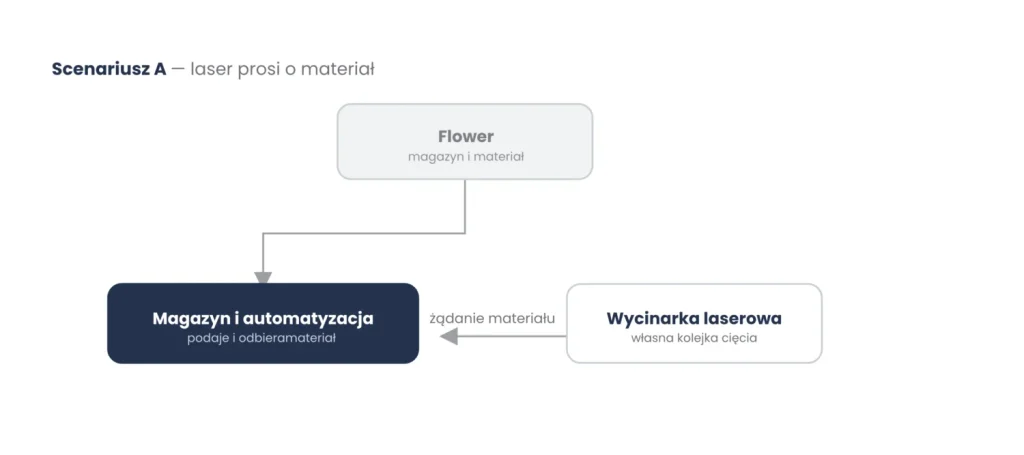
That is all. The list is shorter than most people expect, and that is exactly the core message of this article. The communication cycle is simple, and at its heart are a few pieces of information that are essentially universal and independent of the machine manufacturer.
What this scenario gives you: naturalness and simplicity. The laser knows what it is cutting and manages itself, and the operator works at the machine and can change the plan locally. Commissioning is quick, and the differences between manufacturers are the smallest.
What it does not give you on its own: a view of several machines at once, control over what happens to material after cutting, and a link between production and the actual stock in the storage system. That is not a flaw of this scenario; it is simply a job for another layer, as described in sections 7 and 11.
6. Scenario B: the automation leads
In the second scenario, it is the automation system that manages the cutting queue: it keeps track of which program is to be run and how many times, decides what material goes on the table and when, and starts the cutting process itself.
The set of signals exchanged is then much wider.
From the automation system to the laser cutter:
- Cutting programs or paths to programs.
- Start of the cutting process.
- Stop and reset of the cutting process.
- In the extended version, control of the laser cutter tables: extend table A, extend table B, raise, lower.
From the laser cutter to the automation system:
- Information about the program started.
- Information that the cutting program has finished correctly.
- Information about the state of the safety system and the machine’s readiness to work.
- Table positions, if we are controlling them.
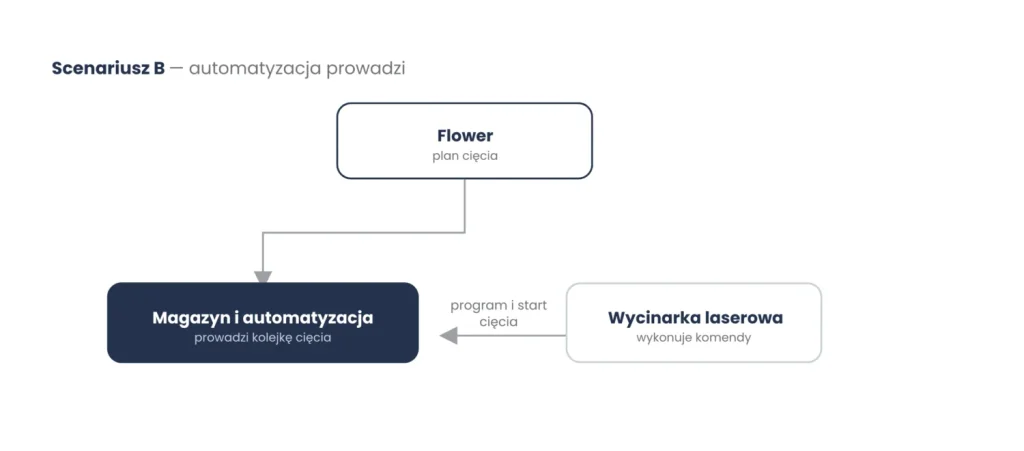
The last item on the first list is often the most demanding. In extreme cases, the automation controls the laser cutter table at the level of exchange logic rather than a simple “insert table A” command. A whole sequence of commands then has to be sent to the individual table drives, in the right order and under the right conditions.
Let us be honest: this solution is more difficult, and the differences between manufacturers are greatest here. Each has its own, often unique approach. We have to go much deeper into how the specific machine works: not into the cutting process itself, which we leave to the process engineers, but into how production is managed and how the table works. Commissioning takes longer, and the scope of analysis is wider.
It is still feasible, though, and comes down to exchanging a few pieces of information that remain universal. When this scenario is the right choice is covered in section 9.
7. Scenario C: central plan, local cycle
This is the setup we recommend wherever we have a real choice, and the best example of why it is worth thinking in two axes instead of one.
It combines two things:
- the material exchange cycle is initiated by the laser cutter (as in scenario A),
- the production plan lives in the Flower software (as in scenario B).
In practice, this means that the full production plan stays on our side, and the laser cutter receives only the next few cuts, as many as needed to keep work flowing smoothly. The laser cutter works on what it has received and asks for material itself when it needs it. We plan, prepare and deliver; it executes.
This is a deliberate design decision, not a limitation. Sending the whole queue would mean the plan lives in two places at once, and every change of priorities would require clearing it and sending it again. With a short horizon, the plan can be rearranged freely, practically until the last moment, and the operator keeps the option of putting something directly into the laser cutter, outside the plan.
This requires a few additional capabilities from the machine interface: accepting a queue of programs, clearing that queue and, ideally, also sending back information about the current state of the cutting queue, correct completion and errors.
What this means:
- We manage production on many laser cutters from one place, in one plan.
- We optimize the work of the laser cutters and the storage system for material availability at the right time.
- We control the material flow and know which parts came from which sheet and which batch.
- The operator at the machine keeps full flexibility.
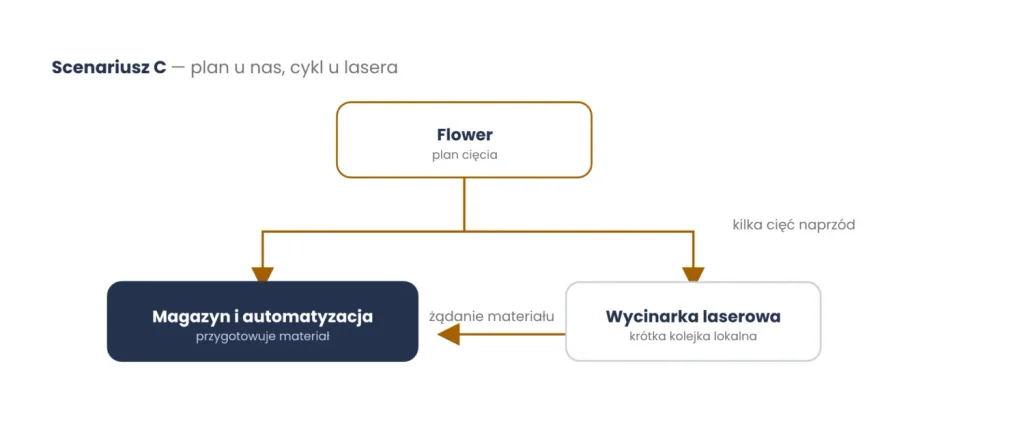
That fourth point is more important than it seems. Imagine a typical situation: something has to be done urgently, outside the plan. The operator adds a program locally at the laser cutter, or we swap the next cuts in the central plan. And the automation keeps working fully automatically, because it prepares based on the central plan but executes what the machine actually asks for. There is no need for manual or semi-automatic loading, no downtime, no “working around the system”.
That is the whole idea of this setup: we do not give up on planning and process tracking, and at the same time we do not take away the shop floor’s ability to react. In an environment of rapidly changing priorities, this is usually the difference between a system that works and a system that operators try to work around.
On our side, this layer is handled by Flower Pro, the module for central management of laser production, linked to the automated storage system and transport automation. For a single laser cutter, where an orderly cutting queue is all that is needed, the same role is played by the simpler Flower Plan.
8. The automation always knows what is on the table
Whichever of the three scenarios is chosen, one rule applies: we keep our own model of the state of each laser cutter table: we know whether something is on it, what exactly and in what condition.
This matters most where the cycle is initiated by the laser cutter. If we took literally that the automation “only responds to requests”, it would be an ordinary feeder blindly executing someone else’s commands. That is not how it works.
The consequences are very practical. If the laser cutter asks for loading but something has been left on the table, we will unload first anyway. We will never put a sheet on top of a sheet. We will never move into a table whose state we do not know.
This is also one of the more important parts of our know-how. Laser cutters signal the end of cutting in very different ways. Some send a clear end-of-program signal. Others do not signal it at all, and the only information we have is that the machine is swapping tables. Our job is to translate what a given machine actually says into a single internal message: “there is a sheet on the table cut with program X”. From that moment, the rest of the system (storage, transport, planning, material tracking) works the same way regardless of which machine the information came from.
9. Which scenario when
In many projects there is simply no choice: we take what the machine provides and get the most out of it. But when there is a choice, the decision should look like this:
| Situation | Recommendation | Why |
|---|---|---|
| The laser cutter provides table service requests and accepts a queue of programs | Scenario C | Full control over the plan without losing flexibility at the machine |
| The laser cutter provides only table service requests | Scenario A | The simplest and quickest to commission; the plan stays on the machine |
| The laser cutter does not manage its own queue sensibly or does not accept a plan | Scenario B | Someone has to run the queue, so we do it |
| Several laser cutters served by one storage system | Scenario C, exceptionally B | Without a central plan, material availability cannot be optimized |
| One laser cutter, a simple process, stable orders | Scenario A | There is no point building planning that nobody will use |
| The storage system also serves processes other than cutting | Scenario C | Material flow has to be planned more broadly than at the level of one machine |
| Highly variable priorities, many urgent orders | Scenario C | A central plan plus local freedom for the operator |
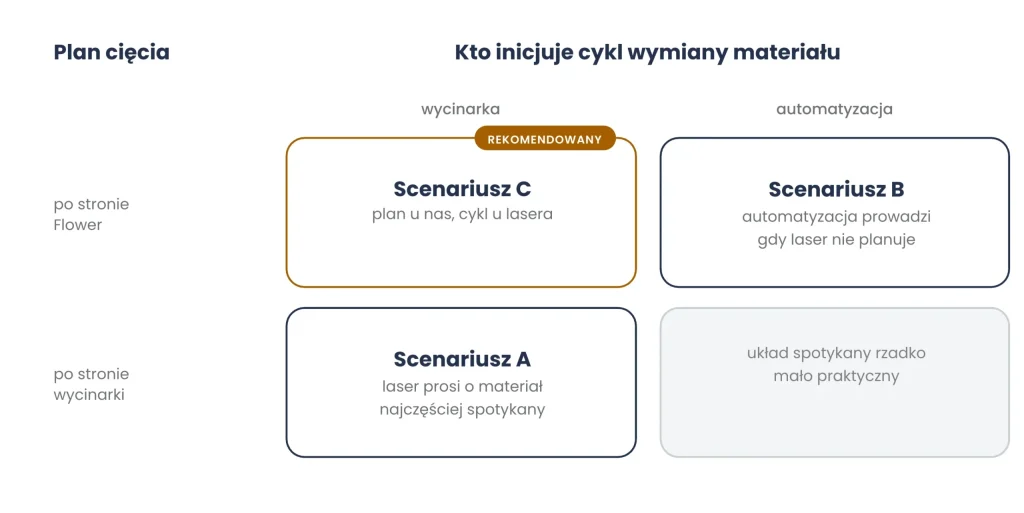
One practical note: we also allow intermediate setups. If the laser cutter’s interface implements a communication scenario other than those described above, we analyze it and adjust the scope of signals exchanged. In that case, all that is needed is an analysis on our side beforehand.
10. How the system knows what to cut and from what
The data layer is what distinguishes automation from an advanced feeder. Three questions come up here: how do we know what material is needed, how do we know which specific sheet should be taken, and what remains from it for later.
For us, the source of truth is the NC program. We read cutting programs and extract material information from them: grade, thickness, sheet format and sometimes an index. We prefer this solution because the program is the only document that definitely describes what will actually be cut.
Two other options are also possible. The laser cutter itself can request the material, in which case we accept its request. Or the data can come directly from the CAD/CAM system if we integrate with it directly. Connections of this kind, as well as integration with the customer’s ERP, MES or WMS, are handled by our Flower Link integration layer.
Whatever the source, the operator stays in control: they can change the assigned material or reserve a specific batch for a specific cut. This matters wherever the certificate, the heat or a requirement to make a whole order from one delivery is important.
The end result is traceability. The cutting task is linked to the material, batch, program, machine and execution, and stock levels are managed by Flower Store. After the fact, you can reconstruct what was cut, when, on what and from what, which can be an argument not only in complaints but also in end customers’ audits.
11. What happens to material after cutting
This is the area where the difference between automation dedicated to one machine and automation that manages material flow is greatest, and most profitable.
A simple rule like “this laser cutter puts things there” is only enough in very orderly production. In reality, orders get mixed, part of one order runs on one machine and part on another, and priorities change during a shift. The system then has to make specific decisions:
- Does the cut sheet go back to the automated storage system or to an access point where an operator works?
- Which programs may be mixed on one shelf and which may not?
- Do we build stacks, or do we put each sheet away separately?
- Do we group by order, by program, by material, or simply by how much fits on the shelf?
- What do we do when two laser cutters are working on the same order at the same time?
Few laser cutters, even with their own automation, have extensive functions for this, because from their perspective the process ends when cutting ends. From the plant’s perspective, that is when it really begins.
In Baumalog systems, put-away strategies are configurable, and the operator can always specify a particular shelf or cart. The same storage system can also handle picking of sheets for shipping or for the next production stages, which is the job of Flower Pick. In other words, the storage system is not just a buffer for the laser.
12. Who takes responsibility: the assembly of machinery and CE
This question comes up less often than it should, and it is one of the most important.
Connecting a laser cutter with an automation system creates a new assembly of machinery, that is, machines arranged and controlled so that they function as an integrated whole. Such an assembly requires its own risk assessment and its own conformity assessment. It is not enough that the laser has its own CE and the storage system has its own.
In the vast majority of our projects, Baumalog issues the declaration of conformity for the entire assembly of machinery. This means one point of contact for questions about the safety of the whole system and no situation in which two companies send the customer back and forth to each other.
It is also worth keeping the date in mind. From 20 January 2027, Regulation (EU) 2023/1230 applies, replacing the Machinery Directive 2006/42/EC, and machines placed on the market from that day must meet its requirements. What counts is when the machine is placed on the market, not when it was manufactured, so for an investment handed over in 2027 it is worth settling this at the contract stage.
13. How it is built technically: a set of adapters
Every laser is different, and each speaks a slightly different language. Our approach is easiest to explain with an analogy to USB-C adapters: we have one internal standard and a set of adapters that convert whatever a specific machine provides into it. A new laser cutter does not mean a new system; it means a new adapter.
The same principle works on two levels. At the automation level, we support:
- Digital signals: inputs and outputs; everything related to safety is implemented this way only.
- Standard industrial protocols: EtherCAT, PROFINET, PROFIBUS, Modbus, Modbus TCP, EtherNet/IP, OPC and related.
- TCP/IP-based protocols: socket communication, HTTP, SignalR and others commonly used in IT.
- File exchange and data in databases: where other routes are not available.
At the IT systems level, a similar role is played by Flower Link, which normalizes communication with the customer’s ERP, MES, WMS and CAD/CAM in the same way.
The result is that the system logic (planning, material flow, table state, traceability) always stays the same. Only the layer closest to the machine changes. That is why integrating with a laser cutter we have not seen before is a task we can estimate, not a research project.
14. What if the laser cutter does not provide a full interface
It happens. Not often, but it happens, especially with older machines. Then we look for a solution at another level and usually find one.
Possible routes:
- Connecting to the laser cutter’s physical buttons. If the machine has a button to confirm table service, the automation can “press” it instead of the operator.
- Confirmation on the machine panel. If there are no physical buttons, some operations are confirmed by the operator: less convenient, but still controlled.
- Cyclic operation. Some machines simply finish cutting and swap tables, assuming the material is always correct.
In each of these cases, the same rule applies as in section 8: we always add sensors that detect the actual state of the table, and we always look for a way to block table movement at moments when it should not move, for example by using the same interlock circuits that would trip if an operator entered the machine’s working area. So we use the safety functions the laser cutter already has instead of bypassing them.
Each such case requires individual analysis, and to be honest, the possibilities for controlling production are smaller then. But for a plant, the difference between “it cannot be done” and “it can be done to a limited extent” is fundamental.
Two final remarks. We design the solutions in this section to be fully reversible: the machine can be restored to its original state. And second: on laser cutters that are still under warranty, we simply try not to use this route, so as not to create any room for disputes with the manufacturer.
15. What such a project looks like in practice
What we need from the other side
- Documentation of the laser cutter’s communication interface. This is the basic requirement.
- An installed and configured interface and a prepared connection point for the cables in line with the documentation. The interface is sometimes a paid option: it is worth checking this when buying the machine, not when installing the automation.
- Support with diagnostics, operation and configuration of the interface during integration. Preferably from the laser cutter manufacturer.
On our side lies adapting the control system to the protocol provided. If the above conditions are met, we take this on entirely.
How long it takes
Counted from the moment the machines stand side by side until full automatic production:
- A laser cutter we have worked with before: connecting and testing the interface takes 1 to 2 days in 90% of cases.
- A laser cutter we have not dealt with before: usually 2 to 3 days until everything is connected, sometimes even one day. Then one to two weeks of testing and production assistance.
As of the publication of this article, we have completed integrations with laser cutters from 12 different manufacturers, with many more individual machines, of course. Each new one is above all work on the adapter, not on the system.
16. Checklist: what to ask the laser cutter supplier
When buying a laser cutter, with automation planned right away or only in a few years, it is worth asking the machine supplier the following questions before signing the contract:
- Does the machine provide an interface for communicating with external automation systems?
- Is this interface included in the machine price, or is it a paid extra option?
- What communication medium does it use: digital signals, an industrial network, a TCP/IP-based protocol?
- Can the machine send table service requests, and does it include material information with them?
- Does it send information about the program being cut and the end of cutting?
- Can it accept a whole queue of programs, not just a single program?
- Does it provide information about which table is outside, and if not, does it allow additional sensors to be installed?
- Will the interface documentation be made available, and can it be passed on to an external automation supplier?
- Will the manufacturer’s service provide support with commissioning and configuring the interface?
- Does connecting automation from an independent supplier affect the machine’s warranty in any way?
The answers to these ten questions are enough to assess whether, and in which scenario, the machine can be automated.
We ask the last question deliberately, so we give our answer right away. Connecting automation is not a modification of the machine. We use the interface that the manufacturer itself designs, documents and sells precisely so that the laser cutter can work with external systems. We do not interfere with its design or its control system. That is why in practice we do not see warranties being challenged, and in the solutions described in section 14 we additionally protect ourselves with full reversibility.
17. Summary
Three things worth remembering from the whole text:
- Integration is a process, not magic. It comes down to exchanging a dozen or so clearly defined signals. The details can be complicated, but the mechanism is the same everywhere and has a predictable schedule.
- Choosing a scenario is a business decision, not just a technical one. The question is not “who is more important, the laser or the automation”, but “who should manage the plan and who the cycle”. Those are two different answers.
- Responsibility can be assigned unambiguously. The assembly of machinery, the risk assessment, the declaration of conformity: this is not a gray area between two suppliers.
If cutting automation is in your plans and you are wondering what can be done with a specific machine already standing in your hall, get in touch with us. Usually the interface documentation is enough to say directly which scenario is possible and how long commissioning will take.